Oct 20, 2026
How to Get Real-Time Alerts When Competitors Change Their Messaging
Your top competitor just repositioned their entire product line around a new AI feature. Your sales team will find out in three weeks when a prospect parrots

Introduction
Your top competitor just repositioned their entire product line around a new AI feature. Your sales team will find out in three weeks when a prospect parrots the new pitch back to them. That lag is costing you deals.
72% of businesses lose deals because they react too slowly to competitor moves, and teams waste an average of 3.2 hours per week on manual checks that still miss critical shifts. The old model of periodic, manual competitor tracking is broken.
A new generation of AI-driven contextual alerting tools detects a pricing change and explains its significance: the competitor cut their Pro plan by 20%, and here is how your team should respond. This guide walks through the six-step methodology for moving from reactive scrambling to an always-on, real-time competitive intelligence system.
Key Takeaways
Real-time competitive intelligence shifts the workflow from periodic manual checks to an always-on system that delivers context. Here is what the five-step methodology accomplishes:
- Monitor strategically, not exhaustively: Focus on pricing pages, changelogs, hidden sub-pages, and social channels where messaging shifts first surface, preventing alert fatigue.
- Move beyond pixel diffs to business impact: AI-powered platforms explain what a change means and recommend a response, rather than simply flagging that "something changed."
- Automate setup with deep-site crawling: Modern tools auto-map a competitor's site structure after you paste a URL, eliminating the need for manual CSS selector configuration.
- Route context to where teams work: Deliver formatted, contextual alerts directly into Slack, Teams, or a CRM via webhooks so intelligence reaches stakeholders instantly.
- Close the loop from alert to action: Auto-generate battlecards and trigger playbooks through API workflows so the organization acts on intelligence immediately.
Step 1: Define Your Monitoring Universe, What to Track and Where

Alert fatigue is the single fastest way to kill a competitive intelligence program. The fix is to monitor the digital assets that signal strategic intent. The table below maps the highest-value targets and what each reveals.
| Asset to Monitor | What It Reveals | Why It Matters |
|---|---|---|
| Pricing page | Price changes, tier restructuring, feature bundling | A 47% of pricing changes go undetected until customers point them out; this is the highest-stakes page to monitor |
| Changelog and product updates page | New feature launches, deprecations, roadmap shifts | Reveals product strategy direction before it appears in sales collateral |
| Hidden sub-pages (e.g., /enterprise, /security) | Enterprise positioning, compliance claims, buyer enablement | Deep-site crawling surfaces these pages that manual checks routinely miss |
| Social channels (LinkedIn, X, TikTok) | Tone shifts, campaign launches, creator partnerships | Tools like Sprout Social track engagement and share of voice to quantify positioning impact |
A platform like Competitor Watch uses deep-site crawling to detect these shifts across pricing pages, changelogs, and hidden sub-pages automatically. Pick assets that correlate directly with revenue exposure. That narrow scope tells you where to send alerts and what to ignore.
Step 2: Choose Your Weapon: From Basic Change Detectors to AI-Powered Platforms

Not all monitoring tools operate in the same league. Basic change detectors answer one question: "Did this page change?" AI-powered platforms answer the question that actually matters: "What does this change mean for my business, and what do I do about it?"
This workflow works for one or two static pages but collapses when scaled to multiple competitors across dozens of pages.
- AI-powered platforms (Competitor Watch, Kompyte, Signum.AI): let you paste a competitor URL and auto-map the site structure, perform semantic analysis to distinguish a permanent pricing restructure from an A/B test, and send an alert like "Competitor cut Pro plan by 20% and added an AI assistant tier that directly overlaps with your Q3 roadmap feature, here is a recommended response." 71% of product marketers say they discover competitor positioning changes reactively, through customer conversations or lost-deal reviews, rather than proactively. The tool choice determines whether you stay in that reactive majority or move to the proactive minority.
Step 3: Set Up AI-Powered Monitoring with Deep-Site Crawling and Auto-Mapping

The setup process for a modern AI-powered monitoring platform removes the technical barrier that made legacy tools operationally expensive.
- Paste the competitor URL: With a platform like Competitor Watch, the AI engine crawls the site structure, automatically mapping product pages, pricing tiers, changelogs, and documentation sub-pages. You do not need to inspect page elements, write CSS selectors, or configure watch zones.
- Instruct the AI on monitoring priorities: Specify what matters, "Track pricing changes, new feature announcements, and messaging shifts on the enterprise page", rather than asking the tool to watch everything. The platform applies these instructions across the auto-mapped structure.
- Daily automated scans: The platform runs scans, comparing each detected change against your priority taxonomy. Signum.AI uses multiple AI models, including GPT-4, Claude, and Gemini, to analyze the data and generate context-rich intelligence.
- Output a prioritized feed: You see strategic shifts ranked by business impact, what a pricing-page update signals for go-to-market positioning and which changelog entries indicate a feature expansion. The entire setup takes under ten minutes, compared to hours of manual configuration on legacy tools.
Step 4: Configure Your Real-Time Alert Channels and Integrations
Intelligence that sits in a dashboard is intelligence that goes stale. The value of real-time monitoring compounds when alerts land directly in the channels where your revenue teams already operate.
- Delivery channels: AI-powered platforms support Slack, Microsoft Teams, email, and webhook endpoints.
- Key configuration decision: Decide where to send alerts and how to format them so the recipient can act without opening another tool. When a competitor changes pricing, a Slack alert includes the company name, the new figure, a one-line business impact statement, and a link to the full analysis, your sales director reads it in three seconds and forwards it to the deal desk.
- Competitor Watch's contextual alerts: Formatted for Slack and email delivery, carrying the business impact analysis and suggested response, plus a link to the full change details.
- Webhook routing: For teams using webhooks, route alerts into a central intelligence log or trigger downstream automation workflows, which is what Step 6 addresses directly.
Step 5: Interpreting Alerts, From 'Something Changed' to Strategic Business Impact

The gap between a raw change alert and a strategic business decision is where competitive intelligence programs either deliver ROI or die. An AI-powered alert carries three layers of information. Reading each layer sequentially turns a notification into a decision.
- Identify the factual change: The alert states "Competitor cut Pro plan price by 20% and added a free AI assistant tier." This is the raw data layer, the what.
- Absorb the business impact analysis: The platform contextualizes the change: "Direct overlap with your Q3 AI roadmap feature at a lower entry price point. Your current Pro plan is now 33% more expensive than the competitor's equivalent tier." This is the analysis layer, the so what.
- Evaluate and execute the suggested response: The alert recommends a specific action: "Arm sales team with a battlecard highlighting your enterprise SSO and dedicated support that the competitor's new tier lacks. Escalate to product marketing for positioning review within 48 hours." This is the action layer, the now what.
A pricing change alert that stops at the factual layer leaves the hardest work to a human. The analysis layer tells you the competitor just undercut your flagship plan by a third while bundling a feature you have on your own near-term roadmap. That turns a notification into a briefing. The action layer closes the loop by naming the first two moves your team should make, arming sales with a specific objection handler today and kicking off a positioning review this week.
Most competitive intelligence tools detect a pixel change on a pricing page. The platform surfaces a structured interpretation of that change and a recommended sequence of next steps. The alert contains where to send alerts, one shareable briefing to route, and one deadline to meet. That sequence keeps the signal from stalling in someone's inbox.
Step 6: Automate Action with Battlecards, API Workflows, and Competitive Playbooks
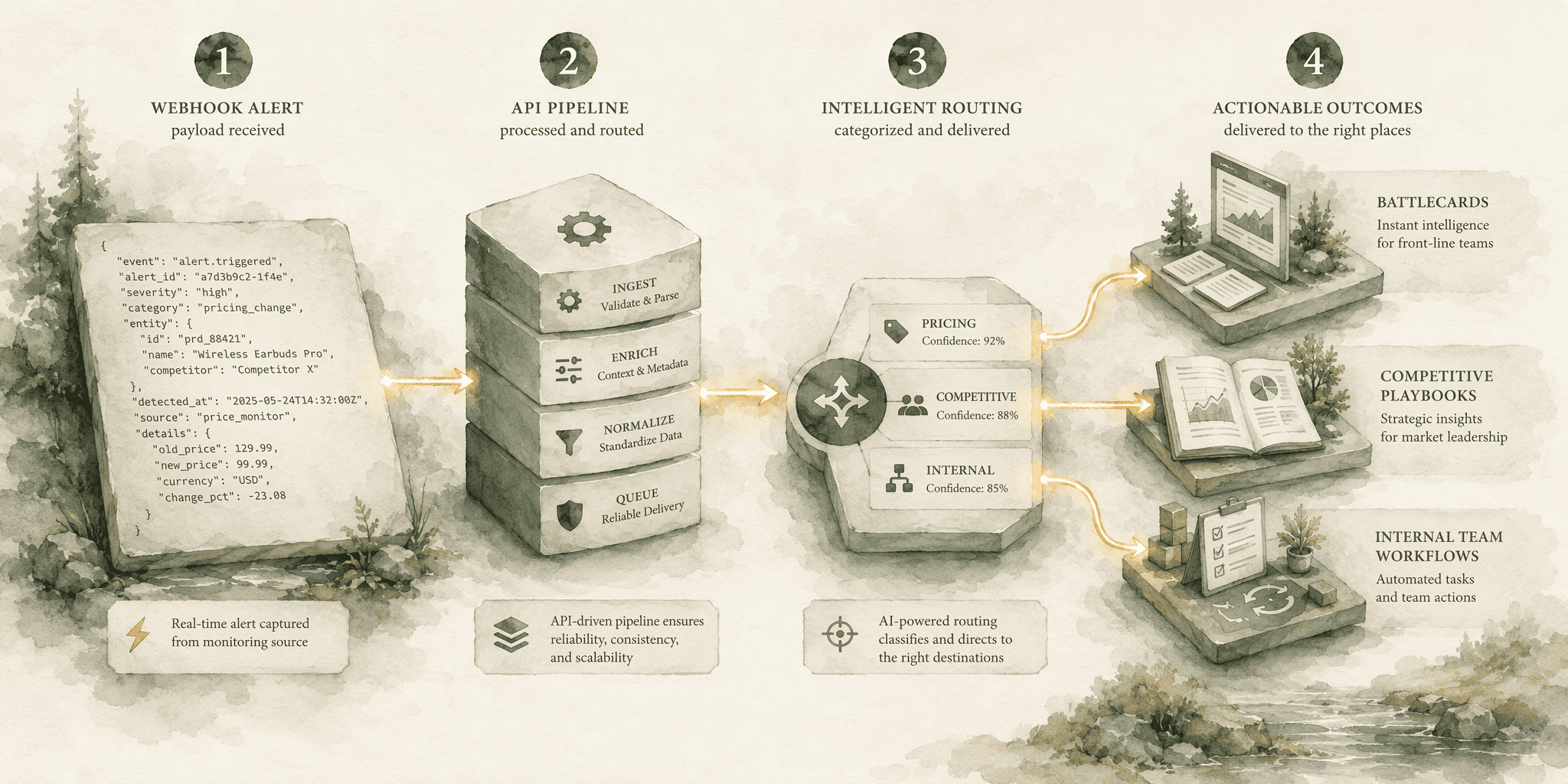
Reading an alert and understanding it is the analyst's job. Getting the organization to act on it before the competitor's move gains traction is the automation challenge. The intelligence-to-action loop closes when alerts programmatically trigger enablement assets and internal workflows.
- Configure a webhook: Receive the contextual alert payload from your monitoring platform. The payload carries structured fields: competitor name, change type, business impact summary, and recommended response.
- Route via automation layer: Use a tool like Zapier, Make, or custom middleware to parse these fields and route them to target systems.
- Pricing change trigger: Creates or updates a competitive battlecard in your CMS or CRM. In Salesforce, this means a new Competitive Insight record linked to the competitor account with impact analysis and counter-positioning points pre-populated.
- New feature launch trigger: Sends a Slack message to the product marketing channel with a templated response playbook: "Competitor launched X. Playbook: 1. Product team evaluates overlap within 72 hours. 2. PMM drafts counter-messaging. 3. Sales enablement session scheduled within one week."
- Platform ecosystem: Platforms like Siftly's competitor monitoring ecosystem support API and MCP integrations that make this programmatic routing possible.
- Final state: An always-on system where a competitor cannot reposition without your entire revenue organization knowing about it, understanding its implications, and receiving pre-built guidance on how to respond, within hours, not weeks.
Conclusion
The 3.2 hours per week teams burn on manual competitor checks, and the 47% of pricing changes that slip through undetected until a customer flags them, are symptoms of a broken intelligence model. The fix isn't checking more often or hiring more analysts. It's shifting from periodic manual detection to an always-on AI-driven system that delivers context and triggers action automatically. When a competitor makes a strategic move, a real-time monitoring stack built on AI-powered platforms closes the response gap to near zero, turning what was once a reactive scramble into a systematic competitive advantage.
Frequently Asked Questions
What tools or platforms exist for real-time monitoring of competitor messaging changes in AI search results?
Platforms like Competitor Watch, Kompyte, and Signum.AI monitor competitor websites and deliver contextual alerts on messaging shifts. For AI search visibility specifically, Siftly tracks brand mentions and citation frequency across ChatGPT, Google AI Overviews, Gemini, and Perplexity, providing competitive benchmarking within AI-generated answers.
How can I automatically track when competitors update their product descriptions, pricing, or positioning across major channels?
Use an AI-powered platform like Competitor Watch or Kompyte. Paste a competitor URL, instruct the AI to monitor pricing and messaging, and it auto-maps the site. The platform runs daily scans and sends contextual alerts to Slack or email when it detects strategic changes, not just pixel diffs.
What specific metrics should I monitor to effectively gauge shifts in competitor messaging?
Monitor pricing changes by dollar amount and percentage, new feature additions and their overlap with your roadmap, tone and value proposition shifts on social channels via share of voice, and the frequency of competitor brand mentions in AI-generated answers relative to your own. Context matters more than change volume.
How does automated AI citation tracking work for competitive messaging analysis?
AI citation tracking executes daily queries across ChatGPT, Google AI Overviews, Gemini, and Perplexity to detect when AI engines cite competitors. Siftly surfaces visibility share, competitor rankings, and source analysis, identifying which competitors AI systems are positioning as authoritative for your target topics.
What are the practical steps to set up a real-time competitor messaging alert system?
Define high-value monitoring targets (pricing pages, changelogs, social channels). Select an AI-powered platform over a basic change detector. Paste the competitor URL and instruct the AI on priorities. Configure alert delivery to Slack, Teams, or webhook endpoints. Interpret alerts using the fact-impact-action framework and automate battlecard generation from alert payloads.
How does Siftly's platform specifically help with detecting competitor messaging changes across AI engines like ChatGPT and Google AI Overviews?
Siftly executes daily automated queries across ChatGPT, Google AI Overviews, Gemini, Perplexity, and Claude. It tracks competitor products and price positions surfaced alongside your brand, provides share of voice analysis, and surfaces which competitors AI engines are citing. The platform's AI Prompt Tracking and Citation Tracking features monitor how AI systems find, judge, and cite competitive content.
Sources
- Competitive Intelligence in AI: The 7-Step GEO Playbook for Owning Brand Visibility - siftly.ai
- AI Competitor Benchmarking Across Every Engine | Siftly - siftly.ai
- Competitor Watch - competitor.watch
- 15 competitor analysis tools to keep tabs on your competition in 2026 - sproutsocial.com
- Competitor Messaging Tracking: Detect Positioning Shifts - visualping.io
- Competitor Brand Monitoring Tool - Track Messaging & Positioning - signum.ai
Keep exploring
More from the blog.

Oct 24, 2026
7 Best AI Optimization Platforms for B2B SaaS Startups on Tight Budgets in 2026
ChatGPT named your B2B SaaS startup during a buyer's evaluation, then told them to go with a competitor.

Oct 24, 2026
7 Best Platforms for Monitoring How AI Perceives Your B2B SaaS Brand in 2026
Your B2B SaaS brand is being evaluated by machines right now. A prospective buyer asks ChatGPT to “compare the top data onboarding tools for mid-market

Oct 23, 2026
How to Optimize Your Brand Presence in Generative AI Search Results
The uncanny silence of organic traffic in analytics dashboards isn't a tracking bug; it's the sound of a fundamental shift.